PRIVATE source repo → PUBLIC site repo⚓︎
More secure way to deploy GitHub Page with repo in resource-public.
With the security concerns of exposing source Markdown files and Git history, I recently switched my previous public GitHub Pages repository to a private source repository, which will only be responsible for building and deploying to a separate public repository.
Let's check the best practices for this private-to-public deployment setup!
Practice Background⚓︎
Let's take my old mkdown blog repo ytianle.github.io as an example, which was public and contained both the MkDocs source files and the generated static site. This meant that anyone could view the Markdown sources, commit history, and author information directly on GitHub.
- Public repo (old):
ytianle.github.io(public, contains both source and generated files)
Migration Target⚓︎
- Private repo (old):
ytianle.github.io→ytianle.github.io_private(MkDocs source, scripts, images, raw notes, build tooling) - Public repo (new):
ytianle.github.io(public, contains generated static files only)
Key Benefits of the Migration
- The old repo can still keeps the full history and author information, but is now private.
mkdocs-git-authors-pluginauthor informationmkdocs-git-revision-date-localized-plugincreation/update timestamps
- The new public repo only contains the generated static files, so the Markdown sources and Git history are not exposed to the public.
One-time GitHub setup⚓︎
- Rename the current repository in GitHub to something private, such as
ytianle.github.io_private. - Change this source repository visibility to Private.
-
In the repo, create a repository secret, which can be named like
PUBLIC_SITE_PUSH_TOKEN.- GitHub → this private repo → Settings
- Secrets and variables → Actions
- New repository secret
- Name
PUBLIC_SITE_PUSH_TOKEN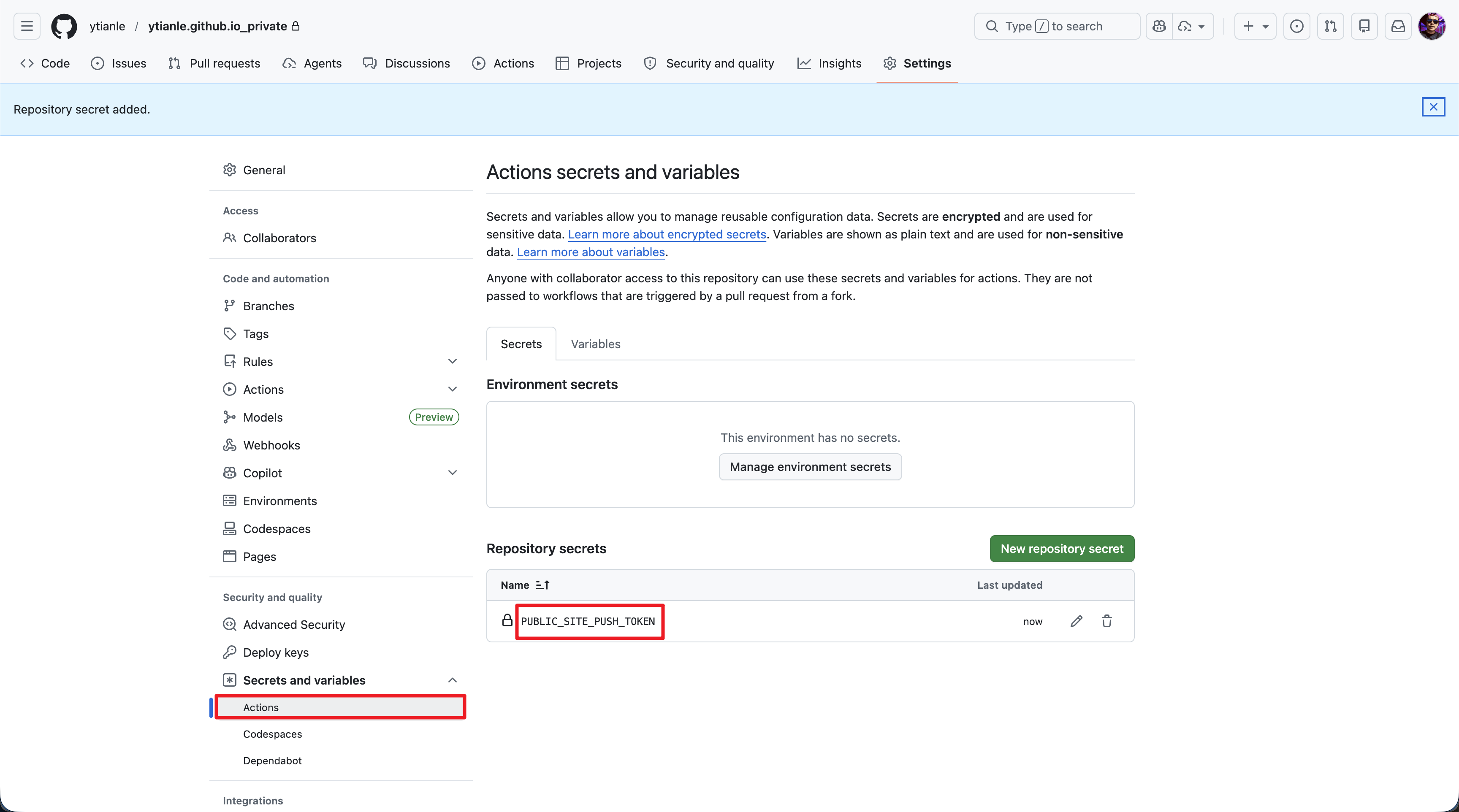 Figure: Create a new repository secret named
 PUBLIC_SITE_PUSH_TOKENin the private source repo.
-
Grant the token repository access
- GitHub Account Profile → Settings
- Developer settings
- Personal access tokens
- Fine-grained tokens
- Create the
PUBLIC_SITE_PUSH_TOKENtoken: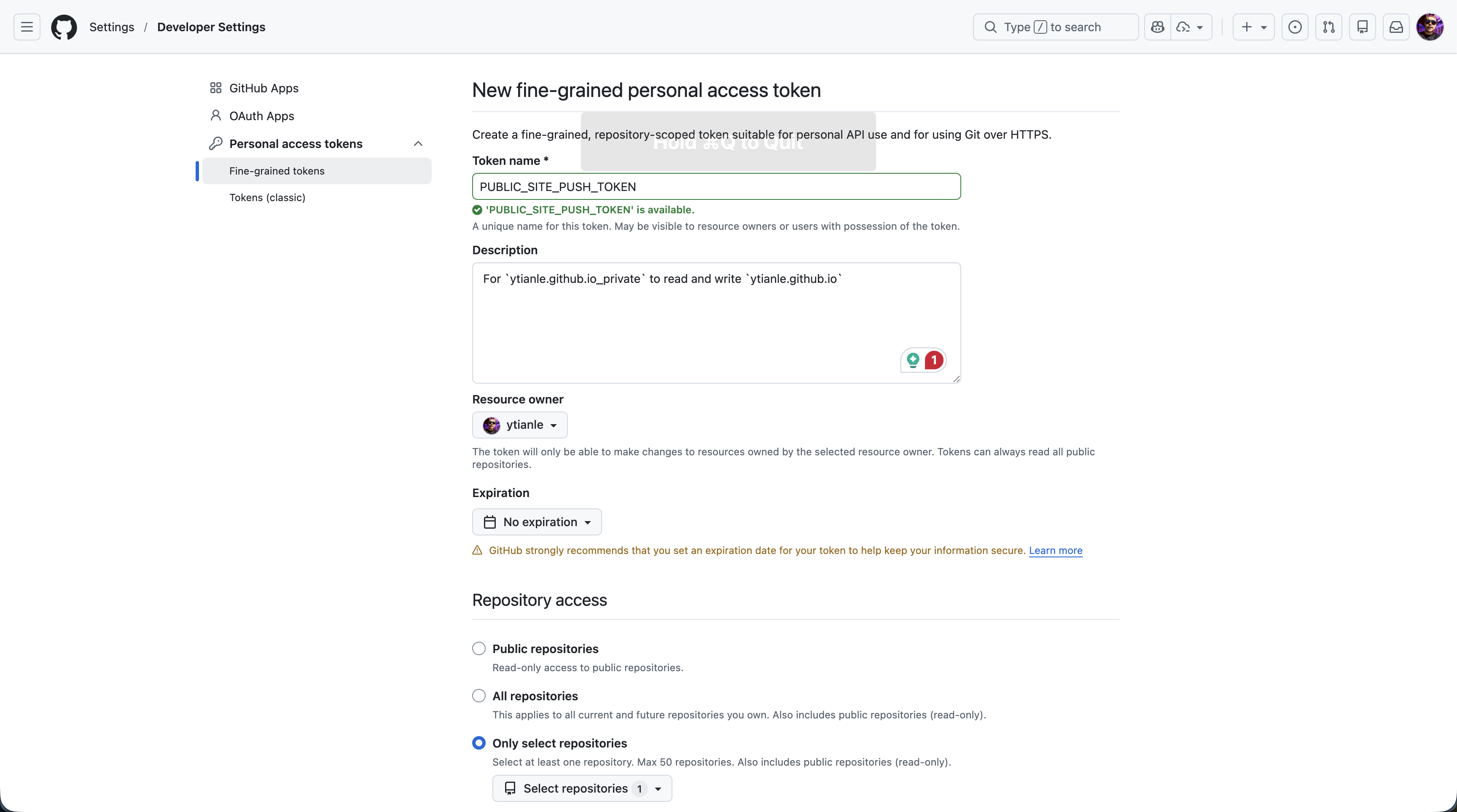
- Edit Repository access - select Only select repositories, including
ytianle/ytianle.github.io - Under Repository permissions, change
ContentstoRead and write: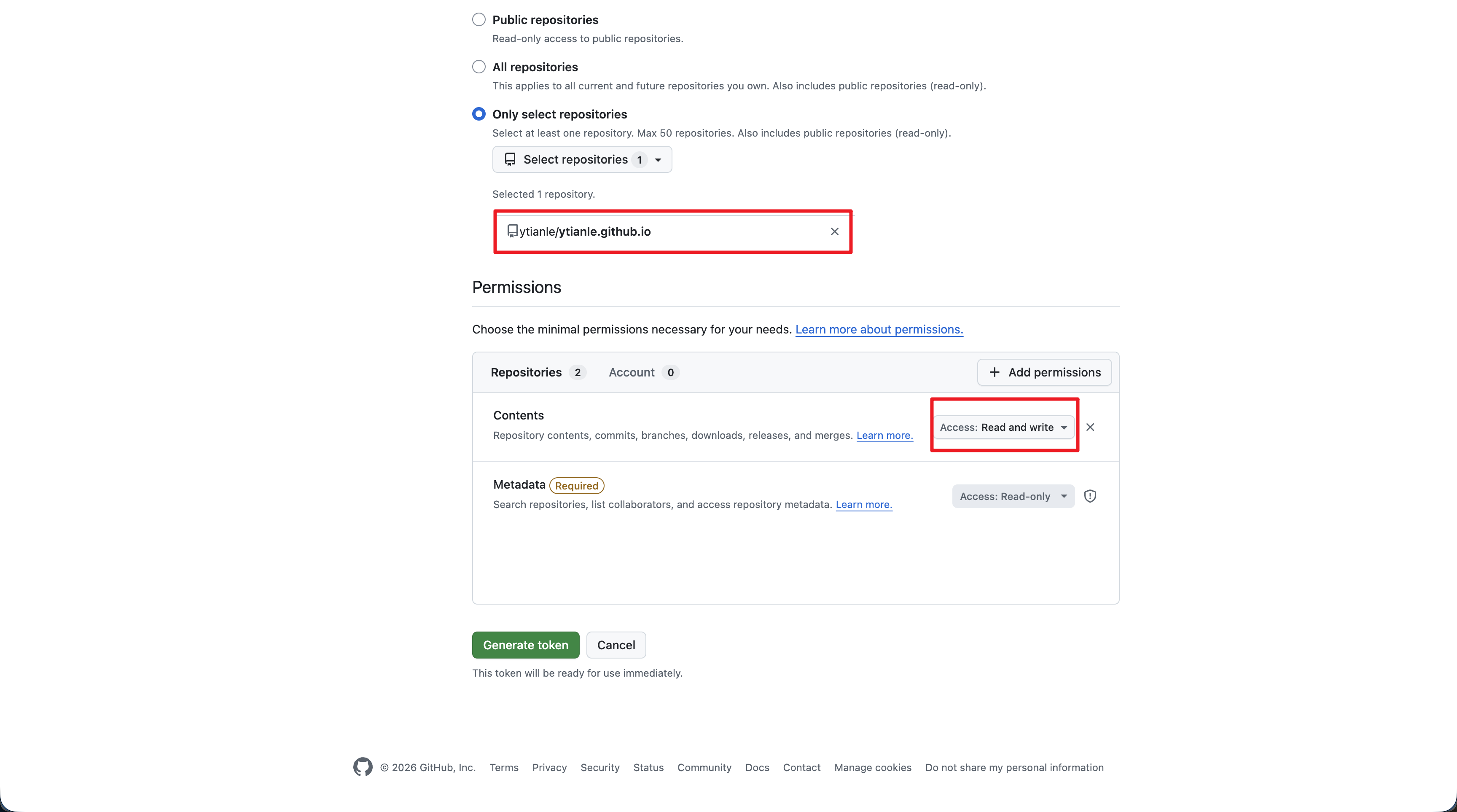
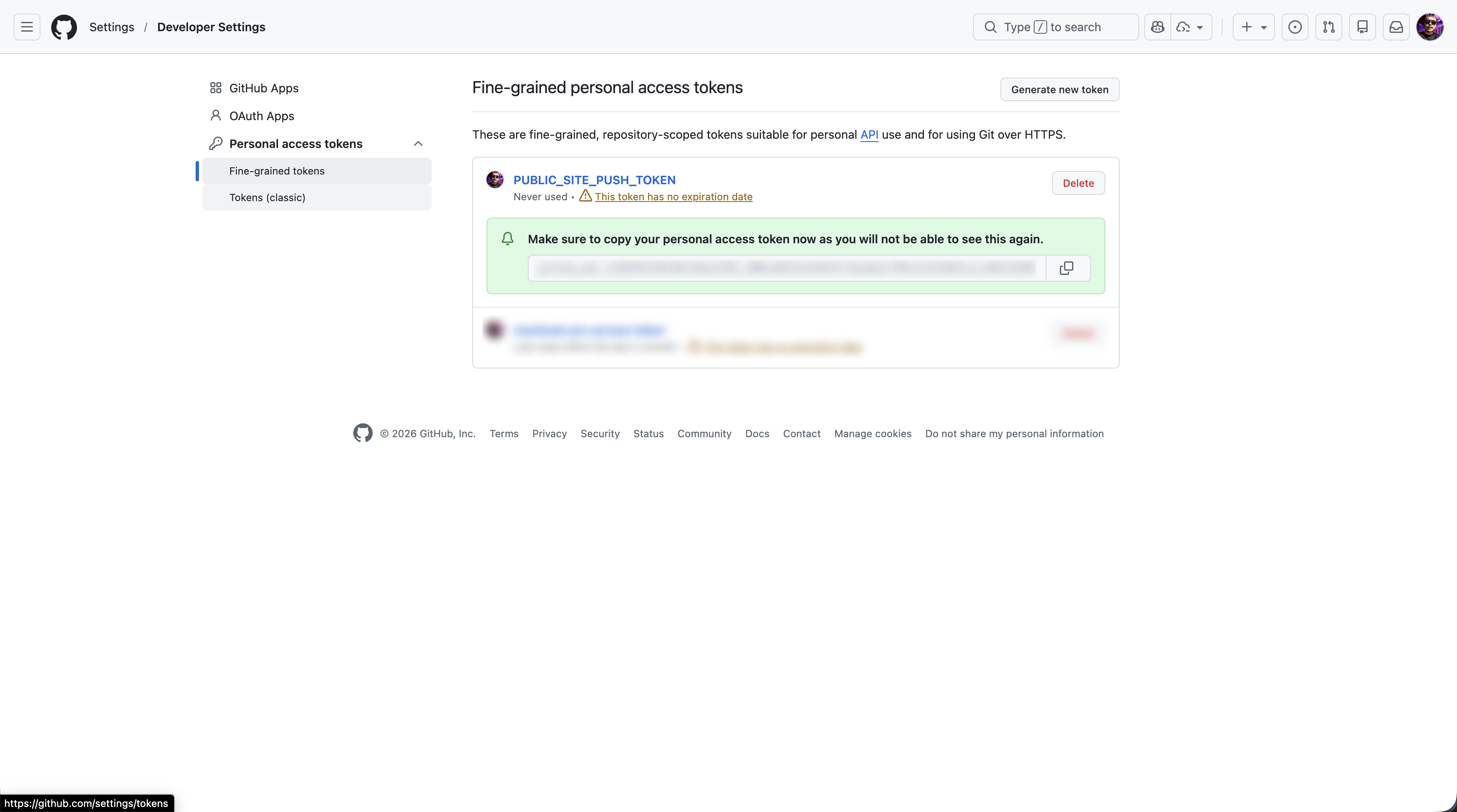
- Generate token and copy the value:
-
After saving, copy the new token value and update the
PUBLIC_SITE_PUSH_TOKENsecret in the private source repository: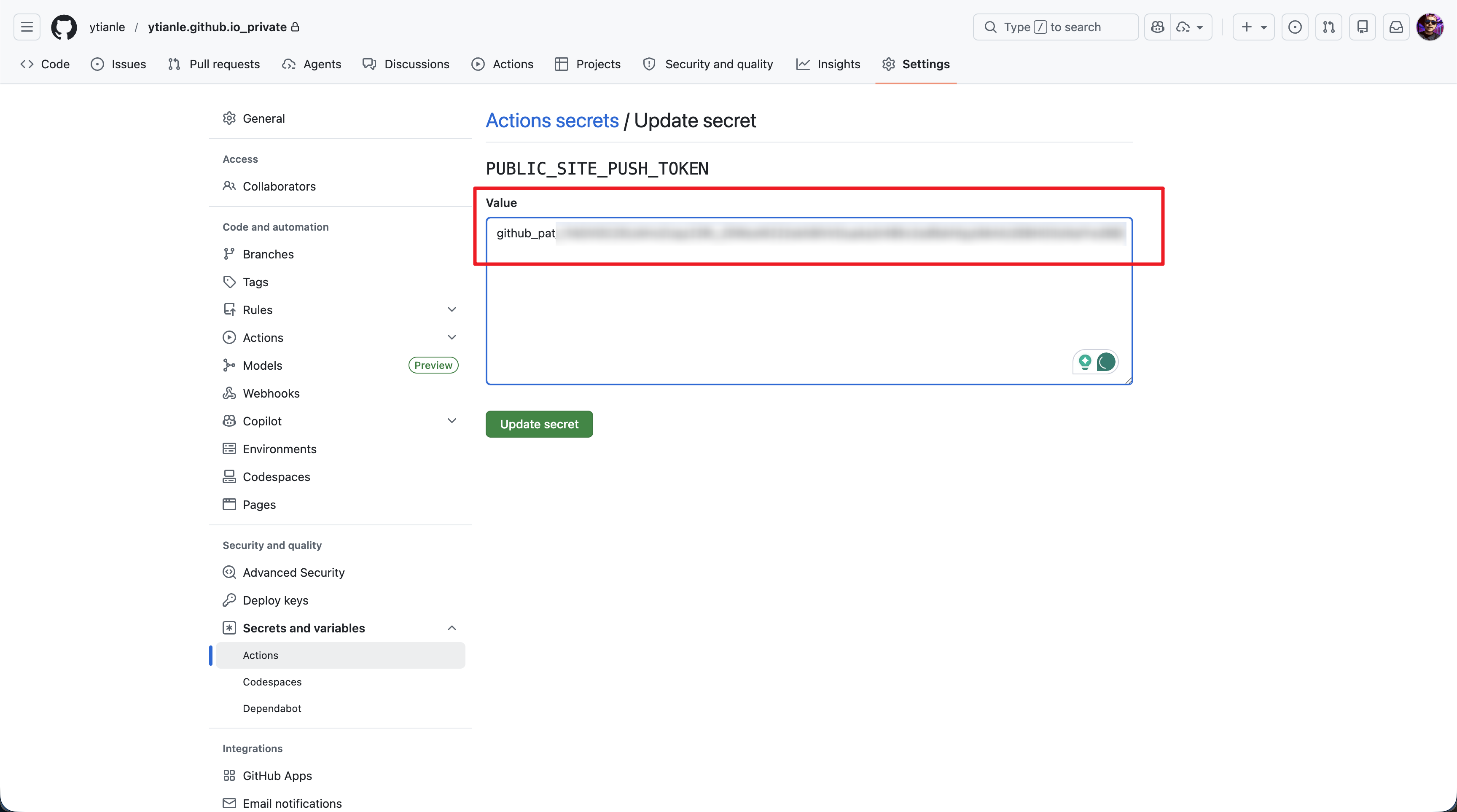
-
Create a new Public repository named
ytianle.github.io. - In the new public repo, keep the default branch as
mainand enable GitHub Pages from themainbranch root.
GitHub Actions Workflow⚓︎
The workflow in .github/workflows/ci.yml does the following on every push to main or master (no need to have gh-pages branch anymore):
sequenceDiagram
  participant PR as Private repo
  participant GA as GitHub Actions
  participant PU as Public repo

  PR->>GA: Push to main/master triggers workflow
  GA->>PR: Checkout full Git history
  GA->>GA: Install dependencies from dependencies.txt
  GA->>GA: Build static site with mkdocs build
  GA->>PU: Clone public repository
  GA->>PU: Remove old generated files
  Note over GA,PU: Preserve CNAME and README.md
  GA->>PU: Copy generated site/ output
  GA->>PU: Commit only if generated files changed
  GA->>PU: Push updated static site to main
ci.yml workflow details⚓︎
name: Deploy public site

on:
  push:
    branches:
      - master
      - main
  workflow_dispatch:

permissions:
  contents: read

concurrency:
  group: public-site-deploy
  cancel-in-progress: true

jobs:
  deploy:
    runs-on: ubuntu-latest
    env:
      TARGET_REPO: ytianle/ytianle.github.io
      TARGET_BRANCH: main
    steps:
      - name: Check out source repository
        uses: actions/checkout@v5
        with:
          fetch-depth: 0

      - name: Set up Python
        uses: actions/setup-python@v6
        with:
          python-version: '3.12'

      - name: Install dependencies
        run: pip install -r dependencies.txt

      - name: Build MkDocs site
        env:
          NO_MKDOCS_2_WARNING: "true"
        run: mkdocs build

      - name: Validate publish token
        env:
          PUBLIC_SITE_PUSH_TOKEN: ${{ secrets.PUBLIC_SITE_PUSH_TOKEN }}
        run: |
          if [[ -z "${PUBLIC_SITE_PUSH_TOKEN:-}" ]]; then
            echo "::error::Missing secret PUBLIC_SITE_PUSH_TOKEN"
            exit 1
          fi

      - name: Publish site to public repository
        env:
          PUBLIC_SITE_PUSH_TOKEN: ${{ secrets.PUBLIC_SITE_PUSH_TOKEN }}
        run: |
          set -euo pipefail

          git config --global user.name "github-actions[bot]"
          git config --global user.email "41898282+github-actions[bot]@users.noreply.github.com"

          temp_dir="$(mktemp -d)"
          trap 'rm -rf "$temp_dir"' EXIT

          encoded_token="$(${pythonLocation}/python -c 'import os, urllib.parse; print(urllib.parse.quote(os.environ["PUBLIC_SITE_PUSH_TOKEN"], safe=""))')"
          repo_owner="${TARGET_REPO%%/*}"

          auth_repo_url="https://${repo_owner}:${encoded_token}@github.com/${TARGET_REPO}.git"

          git clone --depth 1 --branch "$TARGET_BRANCH" "$auth_repo_url" "$temp_dir"

          find "$temp_dir" -mindepth 1 -maxdepth 1 \
            ! -name '.git' \
            ! -name 'CNAME' \
            ! -name 'README.md' \
            -exec rm -rf {} +

          rsync -a --delete --exclude '.git/' --exclude 'CNAME' --exclude 'README.md' site/ "$temp_dir"/

          source_commit_subject="$(git log -1 --pretty=%s)"
          source_commit_body="$(git log -1 --pretty=%b)"

          cd "$temp_dir"
          git add -A

          if git diff --cached --quiet; then
            echo "No public site changes to publish"
            exit 0
          fi

          commit_message_file="$(mktemp)"
          trap 'rm -rf "$temp_dir"; rm -f "$commit_message_file"' EXIT

          {
            printf 'Publish site: %s\n\n' "$source_commit_subject"
            if [[ -n "$source_commit_body" ]]; then
              printf '%s\n\n' "$source_commit_body"
            fi
            printf 'Source: %s@%s\n' "$GITHUB_REPOSITORY" "$GITHUB_SHA"
          } > "$commit_message_file"

          git commit -F "$commit_message_file"
          git push "$auth_repo_url" "HEAD:${TARGET_BRANCH}"